
Understanding the Cyber Kill Chain - TryHackMe Writeup
Hey everyone! Today I’m diving into one of the most fundamental concepts in cybersecurity - the Cyber Kill Chain. This TryHackMe room breaks down how attackers operate and gives us a structured way to understand and defend against cyber threats.
The Cyber Kill Chain framework helps us understand the step-by-step process that adversaries follow to achieve their malicious goals. Let’s explore each phase and see how this knowledge can strengthen our defenses!
What is the Cyber Kill Chain?
The term “kill chain” comes from military strategy, describing the structure of an attack from target identification to destruction. In cybersecurity, this framework maps out the phases that attackers must complete to successfully compromise a target.
Understanding these phases is crucial because if we can disrupt any single step in the chain, we can potentially stop the entire attack. It’s like breaking a chain - remove one link and the whole thing falls apart!
The framework covers seven key phases:
- Reconnaissance - Gathering intel about the target
- Weaponization - Creating the attack tools
- Delivery - Getting the payload to the target
- Exploitation - Executing the attack code
- Installation - Establishing persistence
- Command & Control - Maintaining communication
- Actions on Objectives - Achieving the final goals
Phase 1: Reconnaissance

This is where it all begins - the research and planning phase. Think of it as the attacker doing their homework before the actual attack. During reconnaissance, adversaries gather as much information as possible about their target to inform their next moves.
What Attackers Look For
The information gathered during this phase can include:
- Infrastructure details and network topology
- Employee information and organizational structure
- Business processes and workflows
- Exposed technologies and potential vulnerabilities
OSINT - The Attacker’s Best Friend
A huge part of reconnaissance involves OSINT (Open-Source Intelligence). This is information that’s publicly available and can be collected from sources like:
- Search engines (Google, Bing, specialized search engines)
- Social media platforms (LinkedIn, Twitter, Facebook)
- Company websites and job postings
- Online forums and technical blogs
- Public record databases
- WHOIS data and DNS information
Types of Reconnaissance
Passive Reconnaissance: The attacker gathers information without directly interacting with the target. This is stealthy and hard to detect - like watching a house from across the street.
Active Reconnaissance: Direct interaction with the target system, like port scanning or attempting to connect to services. This is riskier but can provide more detailed information.
Email Harvesting
One particularly effective technique is email harvesting - collecting email addresses from public sources. These emails become ammunition for phishing campaigns in later phases.
Room Questions:
-
Q: What is the name of the Intel Gathering Tool that is a web-based interface to the common tools and resources for open-source intelligence?
-
A: OSINT Framework
-
Q: What is the definition for the email gathering process during the stage of reconnaissance?
-
A: email harvesting
Phase 2: Weaponization

Now that the attacker has gathered intelligence, it’s time to create the weapons! This phase is all about preparing the tools and payloads that will be used in the attack.
Key Components
Malware: Malicious software designed to damage, disrupt, or gain unauthorized access to computer systems. This could be anything from simple trojans to sophisticated ransomware.
Exploits: Programs or code that take advantage of vulnerabilities in applications or systems. Think of these as the keys that unlock security flaws.
Payloads: The malicious code that actually runs on the target system once the exploit succeeds. This is what does the dirty work.
Common Weaponization Tactics
Attackers have several tricks up their sleeves during this phase:
- Malicious Office Documents: Creating infected Word or Excel files with malicious macros or VBA scripts that execute when opened
- USB Drops: Loading malware onto USB drives and distributing them in public places (surprisingly effective!)
- C2 Infrastructure: Setting up command and control servers to communicate with compromised systems
- Backdoors: Creating hidden access points that bypass normal security measures
- Social Engineering: Crafting convincing phishing templates or fake OAuth apps
Room Question:
- Q: What is the term for automated scripts embedded in Microsoft Office documents that can be used to perform tasks or exploited by attackers for malicious purposes?
- A: macro
Phase 3: Delivery

The weapons are ready - now it’s time for delivery! This phase focuses on how attackers get their malicious payload to the target environment. There are several creative methods they use.
Delivery Methods
Phishing Emails: The classic approach. After reconnaissance, attackers craft convincing emails with malicious links or attachments. These often look legitimate and target specific individuals (spear phishing).
USB Drops: A surprisingly effective physical attack vector. Attackers leave infected USB drives in public places like parking lots or coffee shops. Some even go as far as printing company logos on the drives and mailing them as “gifts”!
Watering Hole Attacks: Instead of targeting individuals directly, attackers compromise websites that their targets frequently visit. When victims visit these compromised sites, they unknowingly download malware - like animals drinking from a poisoned watering hole.
Drive-by Downloads
These happen when victims visit compromised websites and malware automatically downloads without their knowledge. Often triggered by malicious pop-ups asking users to download fake browser extensions or updates.
Room Question:
- Q: What do you call an attack targeting a specific group by infecting their frequently visited website?
- A: watering hole attack
Phase 4: Exploitation

This is the moment of truth - when the attacker’s code actually executes on the target system! The delivery was successful, and now it’s time to take advantage of vulnerabilities.
Exploitation Techniques
Malicious Macro Execution: Those infected Office documents from the weaponization phase spring into action. When the victim opens the document and enables macros, the malicious code runs.
Zero-day Exploits: These are the crown jewels of the exploit world - attacks that leverage unknown and unpatched vulnerabilities. Since they’re unknown, there’s no defense against them initially.
Known CVEs: Attackers often target publicly known vulnerabilities that haven’t been patched yet. This is why keeping systems updated is so crucial!
Post-Exploitation Activities
Once initial access is gained, attackers typically:
- Escalate privileges to gain higher-level access
- Move laterally through the network
- Explore the environment to understand the infrastructure
Signs of Exploitation
Security teams should watch for:
- Unexpected process spawns
- Registry changes or new services being created
- Suspicious command-line arguments in system logs
- Unusual network connections
Room Question:
- Q: What is the term for a cyber attack that exploits a software vulnerability that is unknown by software vendors?
- A: Zero-day
Phase 5: Installation

Success! The attacker has gained access to the system. But what happens if they lose their connection or get detected? That’s where the installation phase comes in - establishing persistent access.
The Need for Persistence
Attackers need to ensure they can return to compromised systems even if:
- Their initial access method is discovered and blocked
- The system is rebooted or patched
- Network connections are temporarily lost
Persistence Techniques
Web Shells: Malicious scripts planted on web servers that provide remote access through a web interface. These can be disguised as legitimate files.
Backdoors: Hidden access points that bypass normal authentication mechanisms. These can be software-based or even hardware implants.
Registry Modifications: Adding entries to Windows “run keys” so malicious code executes automatically at startup.
Service Creation: Installing malicious code as a Windows service that runs continuously in the background.
Timestomping - The Art of Hiding
Attackers use timestomping to modify file timestamps (creation, modification, access times) to make malicious files appear legitimate or hide when they were actually created. This helps evade forensic analysis.
Room Questions:
-
Q: What technique is used to modify file time attributes to hide new or changes to existing files?
-
A: Timestomping
-
Q: What malicious script can be planted by an attacker on the web server to maintain access to the compromised system and enables the web server to be accessed remotely?
-
A: Web shell
Phase 6: Command & Control

Now the attacker has persistent access, but they need a way to communicate with the compromised system. This is where Command & Control (C2) infrastructure comes into play.
Evolution of C2 Channels
In the early days, attackers commonly used IRC (Internet Relay Chat) for C2 communications. However, modern security solutions easily detect malicious IRC traffic, so attackers have adapted.
Modern C2 Techniques
HTTP/HTTPS Traffic: The most popular choice today. Malicious traffic blends in with legitimate web browsing:
- HTTP on port 80
- HTTPS on port 443
- Looks like normal web traffic to firewalls and monitoring tools
DNS Tunneling: A clever technique where the compromised machine makes constant DNS requests to an attacker-controlled DNS server. Since DNS is essential for normal operations, this traffic often goes unnoticed.
How C2 Works
Once the C2 channel is established, the attacker has full remote control over the compromised system. They can:
- Execute commands
- Download additional tools
- Exfiltrate data
- Move laterally through the network
Room Question:
- Q: What is the C2 communication where the victim makes regular DNS requests to a DNS server and domain which belong to an attacker?
- A: DNS Tunneling
Phase 7: Actions on Objectives

After successfully navigating through six phases, the attacker finally reaches their ultimate goal. This is where they achieve what they set out to do from the beginning.
Common Objectives
With full access to the compromised environment, attackers can pursue various goals:
Credential Harvesting: Collecting usernames, passwords, and authentication tokens from the compromised systems.
Privilege Escalation: Gaining higher-level access rights to access more sensitive systems and data.
Internal Reconnaissance: Mapping out the internal network to understand the organization’s infrastructure.
Lateral Movement: Spreading through the network to compromise additional systems and gain access to more valuable targets.
Data Exfiltration: The big prize - stealing sensitive data like customer information, intellectual property, or financial records.
Destructive Actions: Some attackers aim to cause damage by:
- Deleting backups and shadow copies
- Corrupting or overwriting critical data
- Deploying ransomware
Shadow Copies
Shadow Copy is a Microsoft technology that creates backup copies or snapshots of files and volumes, even while they’re in use. Attackers often target these because they can contain valuable data and removing them makes recovery much harder.
Room Question:
- Q: What technology is included in Microsoft Windows that can create backup copies or snapshots of files or volumes on the computer, even when they are in use?
- A: Shadow Copy
Practice Analysis: The Target Breach

Let’s put our knowledge to the test with a real-world scenario - the infamous Target data breach of 2013. This was one of the largest data breaches in history and provides an excellent case study for understanding the Cyber Kill Chain in action.
The Target Breach Timeline
On November 27, 2013, attackers began their assault on Target’s systems. The breach continued undetected until December 15, 2013. Target publicly disclosed the breach on December 19, 2013, revealing that approximately 40 million credit and debit card accounts were compromised.
The financial impact was staggering - Target paid $18.5 million in fines under a multistate settlement agreement, making it the largest data-breach settlement in history at the time.
Mapping the Attack to the Kill Chain
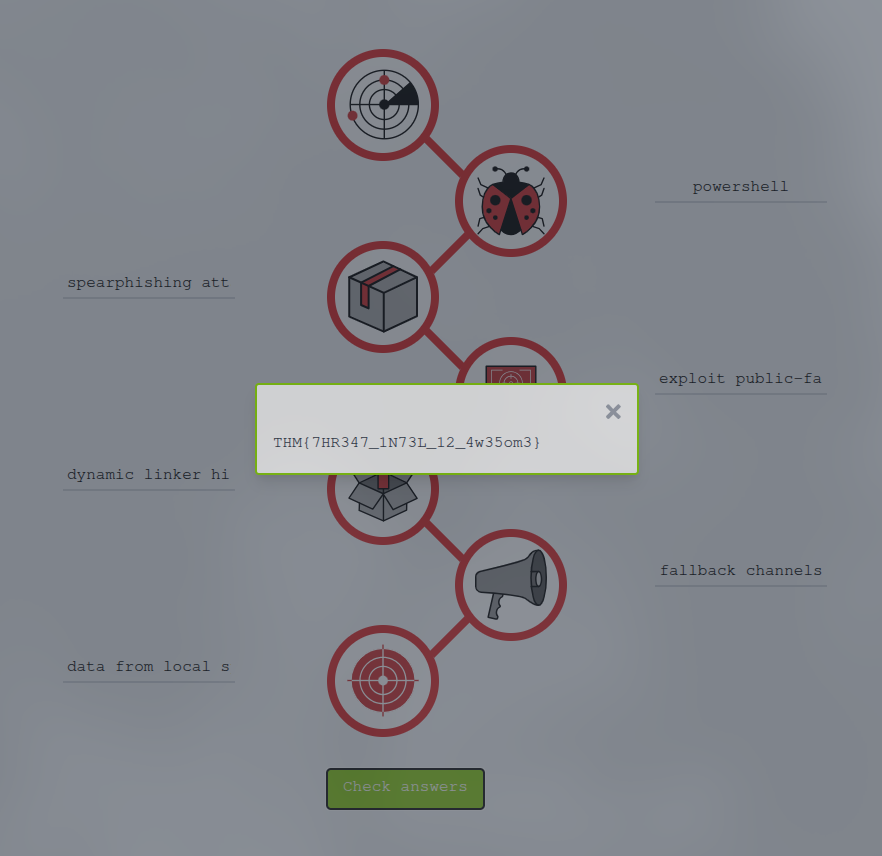
Let’s analyze how this attack unfolded through each phase of the Cyber Kill Chain:
-
Reconnaissance: Attackers researched Target’s infrastructure and identified third-party vendors as potential entry points.
-
Weaponization: They prepared malware and exploits specifically designed to target point-of-sale systems.
-
Delivery: The attack began with a spearphishing attachment sent to a third-party HVAC vendor that had access to Target’s network.
-
Exploitation: Attackers used an exploit public-facing application to gain initial access through the vendor’s compromised credentials.
-
Installation: They established persistence using dynamic linker hijacking techniques and deployed PowerShell scripts for additional functionality.
-
Command & Control: The attackers set up fallback channels to maintain communication with compromised systems.
-
Actions on Objectives: Finally, they achieved their goal of data from local system exfiltration, stealing millions of credit card records.
The completed analysis reveals the flag: THM{7HR347_1N73L_12_4w35om3}
Conclusion and Limitations

The Cyber Kill Chain is undoubtedly a valuable framework for understanding and defending against cyber attacks. However, like any tool, it has its limitations.
Strengths of the Framework
- Provides a structured approach to understanding attack progression
- Helps organizations identify where their defenses might be weak
- Enables proactive security planning
- Useful for incident response and forensic analysis
Limitations to Consider
Age of the Framework: The traditional Cyber Kill Chain was established in 2011 and hasn’t been significantly updated since. The cybersecurity landscape has evolved dramatically, but the framework hasn’t kept pace.
Focus on Perimeter Defense: The framework was designed primarily for network perimeter security and malware threats. Modern attacks are much more sophisticated and diverse.
Insider Threats: The framework doesn’t effectively address insider threats - malicious actors who already have authorized access to systems.
Modern Attack Techniques: Today’s attackers use multiple tactics, techniques, and procedures (TTPs) simultaneously and can adapt quickly to bypass traditional defenses.
Complementary Frameworks
Rather than relying solely on the Cyber Kill Chain, security professionals should consider using it alongside:
MITRE ATT&CK Framework: A more comprehensive and regularly updated knowledge base of adversary tactics and techniques.
Unified Kill Chain: A modern evolution that addresses some limitations of the traditional model.
Diamond Model: Another threat intelligence framework that focuses on the relationships between adversaries, capabilities, infrastructure, and victims.
Key Takeaways
The Cyber Kill Chain remains a fundamental concept in cybersecurity education and provides an excellent starting point for understanding how attacks unfold. While it shouldn’t be your only defensive framework, it’s definitely worth understanding as part of a comprehensive security strategy.
Remember, the goal isn’t just to understand how attacks work - it’s to use this knowledge to build better defenses. By understanding each phase of the kill chain, we can implement controls and monitoring at multiple stages to detect and disrupt attacks before they achieve their objectives.
The most important lesson? Defense in depth is key. Don’t rely on stopping attackers at just one phase - have multiple layers of security so that if one fails, others can still protect your organization.
Stay curious, keep learning, and remember that in cybersecurity, knowledge truly is power! 🔒
This writeup is based on the TryHackMe “Cyber Kill Chain” room. If you found this helpful, consider checking out the room yourself for hands-on practice with these concepts!
Next reads
View all →27 Jan
Probably Just Fine - TryHackMe First Shift CTF Writeup
A step-by-step SOC investigation through TryHackMe's First Shift CTF scenario, covering threat intel lookups, file hash analysis, and report-driven attribution insights.
30 Jan
Cloud Security Pitfalls - TryHackMe Writeup
A friendly, SOC-focused walkthrough of cloud migration risks, shared responsibility, logging challenges, and practical monitoring takeaways.
31 Dec
Mastering Obfuscation Principles - TryHackMe Writeup
A comprehensive guide to understanding obfuscation techniques for malware evasion, from basic concatenation to advanced control flow manipulation. Learn how attackers hide their code and how defenders can spot these techniques.
Get posts by email
One email when I publish, not a drip, not weekly. Sign up and I'll only write when there's something new.
You won't get mail just for signing up. Unsubscribe any time.