
Introduction to Web Services and APIs
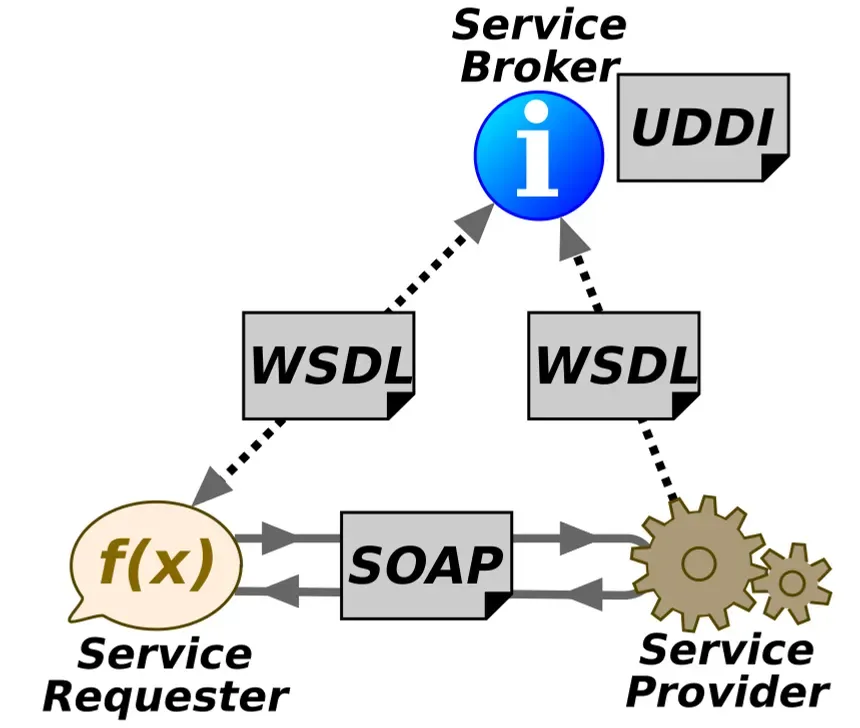
So, what exactly is web service?
According to the W3C, web services provide a standard way for different software applications, running on various platforms and frameworks, to talk to each other. What makes them powerful is their interoperability, extensibility, and machine-readable descriptions usually thanks to XML
Here’s a scenario I like to think about:
- one app is written in Java, running on linux, using an Oracle database.
- another app is written in C++, running on windows, using SQL server with web services, these 2 completely different applications can communicate over the internet without issue. Pretty cool
And what’s an API?
An API (Application Programming Interface) is a set of rules that allows data to be exchanged between different software. The technical spec of each API defines exactly how that exchange happens.
For example: let’s say I have a piece of software that needs to check ticket prices for specific dates. It makes a call to another software’s API, asking for the data. The API specifies how the request should be made and how the response should be returned. That interface between the 2 pieces of software? that’s the API.
Web Service vs API; They’re not the same thing
It’s easy to confuse them, and yes, they’re very similar. Here’s what I’ve learned about their differences:
- web services are a type of API, but not every API is a web service
- web services rarely allow external developers to tinker with them. Many APIs, on the other hand, welcome it.
- Web services often use SOAP for security. APIs use XML-RPC, JSON-RPC, SOAP, REST and more.
- web services typically use XML for data encoding. APIs can use different formats, JSON being the most popular.
Web Service Approaches/Technologies
There are several ways to provide and consume web services. Let me walk you through the main ones.
XML-RPC
XML-RPC uses XML to encode remote procedure calls and parameters. HTTP is usually the transport. Here’s a quick example of what a request looks like:
POST /RPC2 HTTP/1.0User-Agent: Frontier/5.1.2 (WinNT)Host: betty.userland.comContent-Type: text/xmlContent-length: 181
<?xml version="1.0"?><methodCall>  <methodName>examples.getStateName</methodName>  <params>     <param>       <value><i4>41</i4></value>     </param>  </params></methodCall>
and the response:
HTTP/1.1 200 OKConnection: closeContent-Length: 158Content-Type: text/xml
<?xml version="1.0"?><methodResponse>   <params>      <param>        <value><string>South Dakota</string></value>      </param>    </params></methodResponse>
and the response:
HTTP/1.1 200 OKConnection: closeContent-Length: 158Content-Type: text/xml
<?xml version="1.0"?><methodResponse>   <params>      <param>        <value><string>South Dakota</string></value>      </param>    </params></methodResponse>
the <methodCall> structure contains a <methodName> (the method to call) and optional <param>.
JSON-RPC
JSON-RPC does the same thing but uses JSON. Again, HTTP is the usual transport.
Request example:
POST /ENDPOINT HTTP/1.1Host: ...Content-Type: application/json-rpc
{"method": "sum", "params": {"a":3, "b":4}, "id":0}
response:
HTTP/1.1 200 OKContent-Type: application/json-rpc
{"result": 7, "error": null, "id": 0}
You’ll notice the method, params, and id properties. The server echoes back the same id so the client can match requests to responses.
SOAP (Simple Object Access Protocol)
SOAP also uses XML but offers more features compared to XML-RPC. It defines both a header (for routing/processing instructions) and a body (for the actual data). You can optionally describe a SOAP service with WSDL (web services description language)
Anatomy of a SOAP message:
soap:Envelope- required. identifies this as a SOAP messagesoap:Header- OPTIONAL. used for extensionssoap:Body- required. contains the procedure, parameters, and datasoap:Fault- optional. for error messages inside the body.
Example request:
POST /Quotation HTTP/1.0Host: www.xyz.orgContent-Type: text/xml; charset=utf-8
<?xml version="1.0"?><SOAP-ENV:Envelope  xmlns:SOAP-ENV="http://www.w3.org/2001/12/soap-envelope"  SOAP-ENV:encodingStyle="http://www.w3.org/2001/12/soap-encoding">  <SOAP-ENV:Body xmlns:m="http://www.xyz.org/quotations">     <m:GetQuotation>       <m:QuotationsName>MiscroSoft</m:QuotationsName>     </m:GetQuotation>  </SOAP-ENV:Body></SOAP-ENV:Envelope>
response:
HTTP/1.0 200 OKContent-Type: text/xml; charset=utf-8
<?xml version="1.0"?><SOAP-ENV:Envelope  xmlns:SOAP-ENV="http://www.w3.org/2001/12/soap-envelope"  SOAP-ENV:encodingStyle="http://www.w3.org/2001/12/soap-encoding">  <SOAP-ENV:Body xmlns:m="http://www.xyz.org/quotation">     <m:GetQuotationResponse>       <m:Quotation>Here is the quotation</m:Quotation>     </m:GetQuotationResponse>  </SOAP-ENV:Body></SOAP-ENV:Envelope>
note: you might see slightly different SOAP envelopes, but the core anatomy is the same.
WS-BPEL (Web Services Business Execution Language)
These are essentially SOAP web services on steroids, they add functionality for describing and invoking business processes. They’re very similar to SOAP, so I won’t dive deep here.
RESTful(Representational State Transfer)
REST web services usually use XML or JSON. WSDL is supported but rare. HTTP is the transport, and HTTP verbs (GET, POST, PUT, DELETE) are used to interact with resources.
Here’s an example using XML:
POST /api/2.2/auth/signin HTTP/1.1HOST: my-serverContent-Type:text/xml
<tsRequest>  <credentials name="administrator" password="passw0rd">    <site contentUrl="" />  </credentials></tsRequest>
and the same thing using JSON:
POST /api/2.2/auth/signin HTTP/1.1HOST: my-serverContent-Type:application/jsonAccept:application/json
{  "credentials": {    "name": "administrator",    "password": "passw0rd",    "site": {      "contentUrl": ""    }  }}
there are other specifications too; RPC, gRPC, GraphQL, and more.
Don’t feel overwhelmed. In sections ahead, you’ll get hands-on with different web services and APIs.
Next reads
View all →28 May
Building Welsh Motorhub's Buyer Request Funnel
How I built a request-driven car marketplace flow in Kenya: buyer privacy, dealer offer limits, WhatsApp routing, and admin controls.
26 Dec
cURL Exploitation - Hoperation Eggsploit TryHackMe
A hands-on walkthrough of TryHackMe's cURL exploitation room - learning HTTP requests, POST data, cookies, sessions, and brute force attacks from the command line.
25 Dec
n8n CVE-2025-68613: When Workflow Automation Goes Wrong
A comprehensive look at CVE-2025-68613 in n8n - how expression injection can lead to remote code execution and what you can do to protect yourself.
Get posts by email
One email when I publish, not a drip, not weekly. Sign up and I'll only write when there's something new.
You won't get mail just for signing up. Unsubscribe any time.